


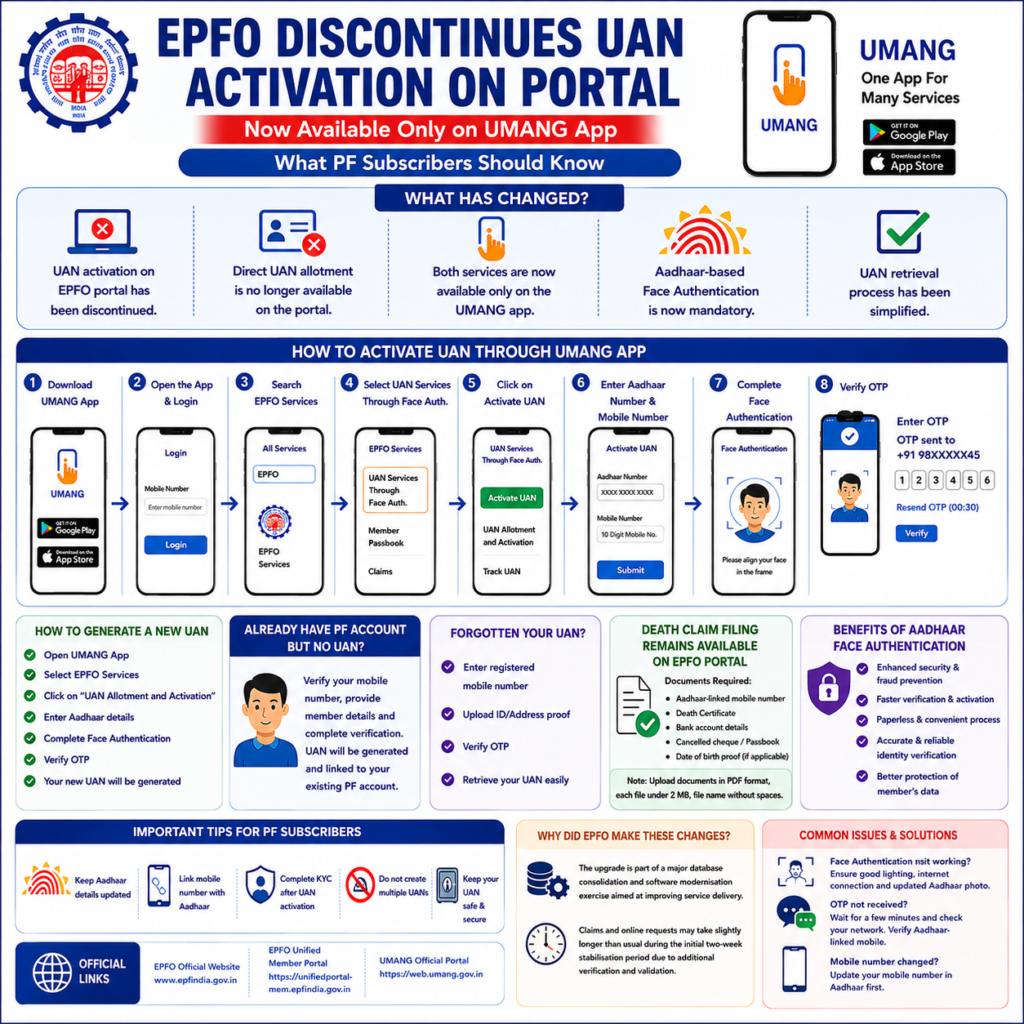
The Employees’ Provident Fund Organisation (EPFO) has introduced one of its biggest digital reforms in recent years by shifting UAN activation and new UAN generation from the EPFO Unified Member Portal to the UMANG app. This major update is part of EPFO’s nationwide modernization project aimed at improving security, speeding up claim processing, and reducing identity fraud.
With the latest upgrade, employees can no longer activate their Universal Account Number (UAN) through the EPFO website. Instead, all new UAN-related services must now be completed through the UMANG (Unified Mobile Application for New-age Governance) app using Aadhaar-based Face Authentication (FAT).
This article explains everything you need to know about the latest EPFO update, why these changes were introduced, step-by-step instructions for activating or generating a UAN, and what PF subscribers should do next.
Table of Contents
- What is EPFO?
- What is UAN?
- Why is UAN Important?
- What Has Changed in EPFO 2026?
- Why Did EPFO Shift UAN Services?
- Complete Steps to Activate UAN Through UMANG
- Steps to Generate a New UAN
- How Existing PF Members Can Get a UAN
- How to Retrieve a Forgotten UAN
- Death Claim Process After the Upgrade
- Documents Required
- Benefits of Aadhaar Face Authentication
- Benefits of the New EPFO Upgrade 2026
- Common Problems and Solutions
- Important Tips for PF Subscribers
- Frequently Asked Questions (FAQs)
- Official Links
- Conclusion
What is EPFO?
The Employees’ Provident Fund Organisation (EPFO) is India’s largest social security organization operating under the Ministry of Labour and Employment, Government of India. It manages provident fund accounts, pension schemes, and insurance benefits for millions of salaried employees.
EPFO offers services such as:
- PF balance checking
- Online claim settlement
- Pension management
- KYC updates
- Passbook download
- UAN services
- Nomination updates
- Employer contributions
Today, most EPFO services are available digitally, reducing paperwork and making the process much easier for employees.
What is UAN?
Universal Account Number (UAN) is a unique 12-digit identification number allotted by EPFO to every employee covered under the EPF Scheme.
A UAN remains the same throughout an employee’s career, even if they change jobs multiple times.
It links all previous and current PF accounts under one single identity.
Why is UAN Important?
Without an activated UAN, employees cannot access many EPFO online services.
An activated UAN allows users to:
- Check PF balance
- Download passbook
- Transfer PF between employers
- File PF withdrawal claims
- Update KYC
- Download UAN card
- Submit nominations
- Track claim status
- View service history
What Has Changed in EPFO 2026?
EPFO recently completed a major software and database upgrade.
Following this update, several services have changed.
1. UAN Activation Removed from EPFO Portal
Subscribers can no longer activate their UAN using the EPFO Unified Member Portal.
2. New UAN Generation Shifted
Generating a fresh UAN from the EPFO website has also been discontinued.
3. UMANG App Becomes Mandatory
Both services are now available only through the UMANG mobile application.
4. Face Authentication is Compulsory
EPFO now requires Aadhaar Face Authentication Technology (FAT) before allowing UAN activation or allotment.
5. Easier UAN Recovery
The process to recover forgotten UAN numbers has been simplified.
Why Did EPFO Shift UAN Services?
According to EPFO, these changes are designed to improve:
- Digital security
- Faster verification
- Fraud prevention
- Identity authentication
- Better database management
- Improved user experience
Using Aadhaar Face Authentication significantly reduces fake registrations and identity theft.
Complete Steps to Activate UAN Through UMANG
Step 1
Download the UMANG App.
Android users can install it from the Google Play Store.
iPhone users can download it from the Apple App Store.
Step 2
Open the application.
Register using your mobile number.
Step 3
Log in.
Step 4
Search for
EPFO Services
Step 5
Select
UAN Services Through Face Authentication
Step 6
Click
Activate UAN
Step 7
Enter
- Aadhaar Number
- Mobile Number
Step 8
Complete Face Authentication.
The app will scan your face for verification.
Step 9
Verify the OTP sent to your Aadhaar-linked mobile number.
Step 10
After successful verification, your UAN becomes activated.
Steps to Generate a New UAN
Employees joining EPF for the first time may need a new UAN.
Follow these steps:
Step 1
Open UMANG.
Step 2
Go to
EPFO Services.
Step 3
Select
UAN Allotment and Activation
Step 4
Enter Aadhaar details.
Step 5
Complete Face Authentication.
Step 6
Verify OTP.
Step 7
Your UAN will be generated automatically.
How Existing PF Members Can Get a UAN
Some employees have PF accounts but never received a UAN.
They should:
- Verify mobile number
- Enter member details
- Complete Aadhaar verification
- Finish Face Authentication
A new UAN will then be linked to the existing PF account.
How to Retrieve a Forgotten UAN
EPFO has simplified UAN retrieval.
Follow these steps:
- Visit the EPFO member services section.
- Select the option to retrieve your UAN.
- Enter your registered mobile number.
- Upload the requested identity or address proof.
- Verify the OTP sent to your mobile.
- Your UAN will be displayed after successful verification.
Death Claim Process After the Upgrade
Unlike UAN services, online death claims are still available on the EPFO portal.
Beneficiaries need:
- Aadhaar-linked mobile number
- Death Certificate
- Bank account details
- Cancelled cheque
- Passbook copy
- Date of Birth proof (if required)
Documents should be:
- PDF format
- Under 2 MB
- File names without spaces
Documents Required
Keep the following ready:
- Aadhaar Card
- Aadhaar-linked mobile number
- PAN Card (optional)
- Bank Account
- Employer details
- Passport-size photo (if requested)
Benefits of Aadhaar Face Authentication
The new verification system offers multiple benefits.
Better Security
Face verification makes identity theft extremely difficult.
Faster Verification
No physical office visit required.
Reduced Fraud
Duplicate UAN generation is minimized.
Paperless Process
Everything is completed digitally.
More Reliable Records
Centralized Aadhaar verification improves database accuracy.
Benefits of the New EPFO Upgrade 2026
1. UPI-Based PF Withdrawals
EPFO is introducing support for UPI-based withdrawals, allowing eligible members to receive their PF claims directly into their linked UPI account instead of relying only on traditional bank transfers.
2. Faster Money Transfers
Once a PF claim is approved, funds can be transferred through UPI almost instantly or much faster than conventional banking methods, reducing waiting time for subscribers.
3. 24×7 Availability
Unlike some banking systems, UPI operates around the clock. This means members can receive funds even outside regular banking hours, depending on the claim approval process.
4. Secure Digital Payments
UPI transactions are protected by multiple security layers, including mobile verification, UPI PIN authentication, and bank-level encryption, ensuring safe transfer of PF funds.
5. Better User Convenience
Subscribers no longer need to depend solely on NEFT or other bank transfer methods. They can receive payments using their preferred UPI-enabled app, making the process more convenient.
6. Reduced Processing Delays
The upgraded EPFO infrastructure, combined with UPI integration and automated verification, helps reduce payment delays after claim approval.
7. Real-Time Payment Notifications
Members receive instant notifications from their UPI app and bank once the PF amount is credited, providing better transparency.
8. Lower Transaction Costs
UPI transactions are generally free for users, allowing EPF members to receive their PF amount without additional payment transfer charges.
9. Improved Financial Inclusion
Members in rural and semi-urban areas who actively use UPI apps can access their PF funds more easily without depending on branch banking.
10. Digital India Initiative
UPI integration supports the Government of India’s vision of expanding digital financial services and making EPFO payments faster, safer, and more accessible.
Important Note
EPFO has announced plans to enable UPI and digital wallet-based PF withdrawals, but the feature is being rolled out in phases. Availability may vary based on EPFO implementation, your bank, and your UPI-enabled account. Members should check the latest updates on the official EPFO website before expecting UPI as a payment option for their claims.
Temporary Issues During Transition
EPFO has informed users that services may experience slight delays during the first two weeks after the upgrade.
Members may notice:
- Slow website response
- Delayed claim processing
- Longer login time
- Additional verification
Subscribers should avoid:
- Repeated claim submissions
- Multiple login attempts
- Creating duplicate requests
Common Problems and Solutions
Face Authentication Not Working
Ensure:
- Good lighting
- Internet connection
- Updated Aadhaar photo
- Latest UMANG version
OTP Not Received
Wait a few minutes.
Check network coverage.
Verify your Aadhaar-linked mobile number.
Mobile Number Changed
Update Aadhaar first before attempting activation.
UAN Already Exists
Do not generate another UAN.
Contact your employer or EPFO helpdesk.
Important Tips for PF Subscribers
- Keep Aadhaar updated.
- Link your mobile number with Aadhaar.
- Complete KYC after UAN activation.
- Avoid multiple UANs.
- Save your UAN securely.
- Check PF passbook regularly.
- Update nominee details.
- Use only official EPFO and UMANG platforms.
Frequently Asked Questions (FAQs)
Is UAN activation available on the EPFO website?
No. UAN activation is now available only through the UMANG app.
Is Face Authentication mandatory?
Yes. Aadhaar-based Face Authentication is compulsory for UAN activation and allotment.
Can I still log in to the EPFO portal?
Yes. Existing members can continue using the portal for most services after activating their UAN.
Can I generate a new UAN from the website?
No. New UAN generation has moved entirely to the UMANG app.
Is the UMANG app free?
Yes. The UMANG application is free for all users.
Can employers still create UANs?
Employers continue to perform their EPFO-related responsibilities, but individual activation and allotment for members now follow the updated UMANG-based workflow where applicable.
Official Links
For official services and information, use these government portals:
- EPFO Official Website: https://www.epfindia.gov.in
- EPFO Unified Member Portal: https://unifiedportal-mem.epfindia.gov.in
- UMANG Official Portal: https://web.umang.gov.in
- Google Play Store (UMANG): https://play.google.com/store/apps/details?id=in.gov.umang.negd.g2c
- Apple App Store (UMANG): https://apps.apple.com/in/app/umang/id1236448857
- UIDAI (Aadhaar): https://uidai.gov.in
Conclusion
The shift of UAN activation and new UAN generation from the EPFO Unified Member Portal to the UMANG app marks a significant step in India’s digital governance journey. By introducing mandatory Aadhaar-based Face Authentication, EPFO aims to strengthen identity verification, reduce fraudulent registrations, and streamline member services.
While subscribers may experience temporary delays as the upgraded system stabilizes, the long-term benefits include improved security, faster digital services, and a more reliable experience for millions of EPF members. Employees should ensure their Aadhaar details and mobile number are up to date, install the UMANG app, and follow the new activation process to continue accessing EPFO services without interruption.